
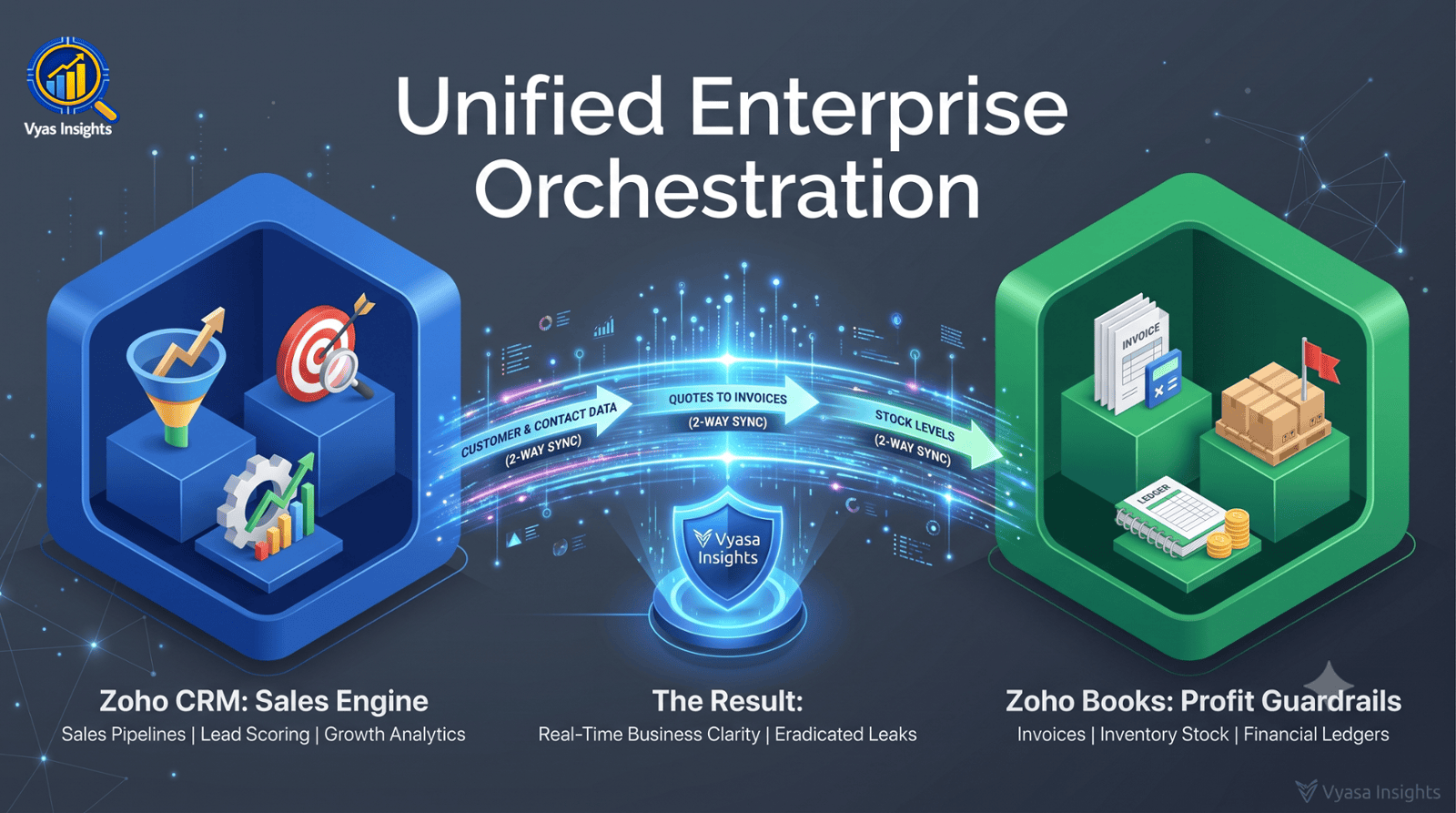
How Connecting Front-Line Sales with Back-Office Accounting Eliminates Operational Leaks
Running a growing business without connected operational software usually leads to predictable symptoms: missing leads, delayed billing, manual data re-entry across spreadsheets, and zero real-time visibility into actual gross profit margins.
When front-line sales teams work in isolation from back-office financial systems, operational leaks inevitably occur.
To build a resilient enterprise, growth systems must handle two core functions:
Zoho CRM: The growth engine designed to drive revenue and manage customer relationships.
Zoho Books: The financial guardrail built to streamline accounting, maintain tax compliance, and protect cash flow.
When connected, these systems transform fragmented operations into a unified business operating model. Below is the step-by-step guide on how both platforms work, who gains the most value, what they cost, how to connect them, and how to onboard your team seamlessly.
Part 1: Zoho CRM — The Growth Engine
Zoho CRM is built to give revenue leaders total visibility over their customer acquisition lifecycle, converting raw inquiries into predictable revenue pipelines.
Who Gains the Most Value?
Sales Leaders & Founders: To eliminate forgotten follow-ups, enforce standardized sales processes, and forecast monthly revenue accurately.
Account Executives & B2B Teams: To track multi-touch negotiations, manage contracts, and store complete customer history in one place.
Multi-Store & Retail Operations: To track store-level lead generation, monitor corporate client orders, and automate customer retention.
Core Workflows to Implement
Pipeline & Deal Stage Management: Map your actual sales cycle into clear visual stages (e.g., Qualification ➔ Store Visit / Audit ➔ Proposal Sent ➔ Contract Signed).
Workflow Rules (Automation): Automate low-value manual tasks. For example, trigger an automated email follow-up whenever a lead remains untouched for 48 hours, or notify a manager when a deal value exceeds a set threshold.
Sales Process Blueprints: Enforce strict compliance on the sales floor. Blueprints require reps to execute specific actions (such as uploading an audit report or taking meeting notes) before moving a deal to the next phase.
Lead Scoring: Automatically prioritize incoming leads based on engagement levels—giving higher scores to prospects who open emails, click proposal links, or request immediate consultations.
Global Cost Structure (USD - Billed Annually)
Free Tier: $0 (Up to 3 users; basic lead management).
Standard: ~$14 / user / month (Custom pipelines, workflow rules, scoring rules).
Professional: ~$23 / user / month (Process blueprints, quotes, inventory management).
Enterprise: ~$40 / user / month (Zia AI assistant, territory management, advanced custom modules).
Part 2: Zoho Books — The Financial Guardrail
While CRM drives top-line revenue, Zoho Books protects bottom-line profitability by managing daily accounting, vendor payments, and tax compliance.
Who Gains the Most Value?
Finance Teams & Accountants: To automate recurring billing, reconcile bank accounts quickly, and eliminate end-of-month manual reporting chaos.
Business Owners & Operations Managers: To track live gross margins per store or branch, monitor inventory valuation, and manage cash flow.
Indian Operations & Multi-Branch Enterprises: To handle GST compliance (GSTR-1, GSTR-3B), generate automated e-Invoices, and create e-Way bills directly from sales ledgers.
Core Workflows to Implement
Automated Invoicing & Receivables: Schedule recurring invoices, send automated payment reminders for overdue accounts, and embed direct online payment options inside digital receipts.
Real-Time Inventory & Stock Valuation: Track inventory levels dynamically. When stock hits defined reorder points, the system alerts procurement teams and generates draft purchase orders automatically.
Direct Bank Feeds & Fast Reconciliation: Link corporate bank accounts to pull in live transaction feeds, auto-categorizing regular expenses and matching payments in clicks.
GST & Audit Readiness: Maintain an audit-proof ledger where every transaction maps to correct tax rules, lowering accounting overhead during audit cycles.
India Cost Structure (INR - Billed Annually + 18% GST)
Free Tier: ₹0 (For businesses under ₹25 Lakhs turnover; 1 user + 1 accountant).
Standard: ~₹749 / month (3 users, GST-compliant invoicing, bank feeds).
Professional: ~₹1,499 / month (5 users, purchase orders, multi-currency accounting, project tracking).
Premium: ~₹2,999 / month (10 users, custom domain, multi-level approval workflows).
Elite: ~₹4,999 / month (15 users, batch & serial number tracking, multi-warehouse stock management).
Part 3: The Power of Connecting CRM + Books
Using CRM or Books individually improves operational efficiency, but integrating them creates a synchronized front-to-back office architecture.
[Prospect Inquires] ➔ [CRM Pipeline Deal] ➔ [Quote Approved]
│
▼ (Native 2-Way Sync)
[Payment Captured] ◄─ [GST Invoice Issued] ◄─ [Zoho Books Account]
Strategic Benefits of the Integration:
Elimination of Double Data Entry: When a deal marks as Closed-Won in Zoho CRM, the integration automatically creates the client profile, sales order, and GST invoice in Zoho Books.
Frontline Financial Context: Sales representatives inside Zoho CRM can view an account's outstanding invoice balance or payment history before starting new contract discussions—without bugging the finance team.
Automated Stock Adjustments: Generating a sales order or estimate in CRM instantly reserves stock and updates warehouse balance numbers inside Books.
🚀 Ready to Unify Your Sales & Accounting Operations?
Stop letting manual data re-entry and fragmented SaaS tools drain your operational margins. You can start setting up your integrated ecosystem today with official free trial access:
CLICK HERE👉 Start your free trial of Zoho CRM →(Drive pipeline visibility & sales automation)
CLICK HERE👉 Start your free trial of Zoho Books free trial of Zoho Books →(Automate GST invoicing & cash flow tracking)
Need professional guidance mapping your store workflows or configuring 2-way sync? Click 👉 Book an Enterprise Operations Audit with Vyas Insights.
Part4: Step-by-Step Technical Setup
Connecting both platforms takes less than 30 minutes through native settings:
Access Integration Hub: Log into Zoho CRM as an Administrator. Navigate to
Settings (Gear Icon) ➔ Marketplace ➔ Zoho Apps ➔ Zoho Books.Authorize Connection: Click Setup Now and verify your Zoho Books organization ID.
Configure Field Mapping:
Map Accounts & Contacts in CRM to Customers in Books.
Map Products / Services in CRM to Items in Books.
Map Deals / Potentials to trigger automatically generated Estimates or Invoices.
Set Sync Direction: Enable 2-Way Synchronization so updates to client records or inventory levels in either app reflect system-wide instantly.
Enable Financial Modules in CRM: Turn on the native financial widget inside CRM record views so sales reps can view quotes, estimates, and payment statuses directly from a client's profile page.
Part 5: Complete Organizational Onboarding Framework
Deploying new software fails when teams are not properly onboarded. Follow this 4-week structured change management framework to ensure high adoption rates across departments.
Week 1: System Foundations & Data Scrubbing
Clean Master Data: Standardize client names, email addresses, tax IDs (GSTINs), and phone numbers in existing spreadsheets before importing.
Configure Finance Rules: Establish your Chart of Accounts, tax rates, payment gateways, and expense categories in Zoho Books.
Set Security Roles: Define user permissions—giving sales reps access to CRM pipelines while restricting access to overall corporate financial metrics inside Books.
Week 2: Process & Automation Configuration
Build custom pipeline stages in CRM that mirror your actual customer journey.
Set up automated notification rules for key events (e.g., deal closed, payment overdue, low inventory alert).
Customize invoice templates, estimates, and email notification headers with company branding.
Week 3: Departmental Training & Pilot Testing
Sales Team Onboarding: Train sales representatives to log every call, update deal stages daily, and generate quotes exclusively through the CRM interface or mobile app.
Finance & Ops Onboarding: Train accounting personnel on handling automated bank feeds, clearing invoices, and executing inventory updates inside Books.
Run Pilot Transactions: Test 5 complete transaction lifecycles—from initial lead creation in CRM to final payment reconciliation in Books—to catch mapping gaps.
Week 4: Full Go-Live & Review
Cut off old manual spreadsheets and mandate that all live customer interactions and invoicing occur inside the new unified system.
Conduct Weekly Reviews: Review weekly adoption metrics—checking for unassigned leads in CRM or unlinked payments in Books.
Iterate Workflows: Refine process blueprints and automated rules based on direct feedback from front-line employees.
Final Thoughts: Moving from Fragmentation to Control
Sustained business growth requires removing friction between generating revenue and managing operations. By moving away from fragmented software tools and establishing a connected Zoho CRM and Zoho Books architecture, enterprise leaders gain complete control over their revenue pipelines, inventory accuracy, and profit margins.
Need help evaluating your store operations, identifying inventory leakage, or structuring your systems for scale? Book a Retail & Business Operations Auditor explore more strategic briefs at Vyas Insights.